AI Crawl Control - Enhanced metrics with drilldowns and filters
AI Crawl Control now offers enhanced metrics visualization and CSV exports to help you track and understand AI crawler activity across your sites, with the ability to group data by crawler, category, operator, host, status code, and referrer sources.
AI Crawl Control now provides enhanced metrics and CSV data exports to help you better understand AI crawler activity across your sites.
What's new
Track crawler requests over time
Visualize crawler activity patterns over time, and group data by different dimensions:
- By Crawler — Track activity from individual AI crawlers (GPTBot, ClaudeBot, Bytespider)
- By Category — Analyze crawler purpose or type
- By Operator — Discover which companies (OpenAI, Anthropic, ByteDance) are crawling your site
- By Host — Break down activity across multiple subdomains
- By Status Code — Monitor HTTP response codes to crawlers (200s, 300s, 400s, 500s)
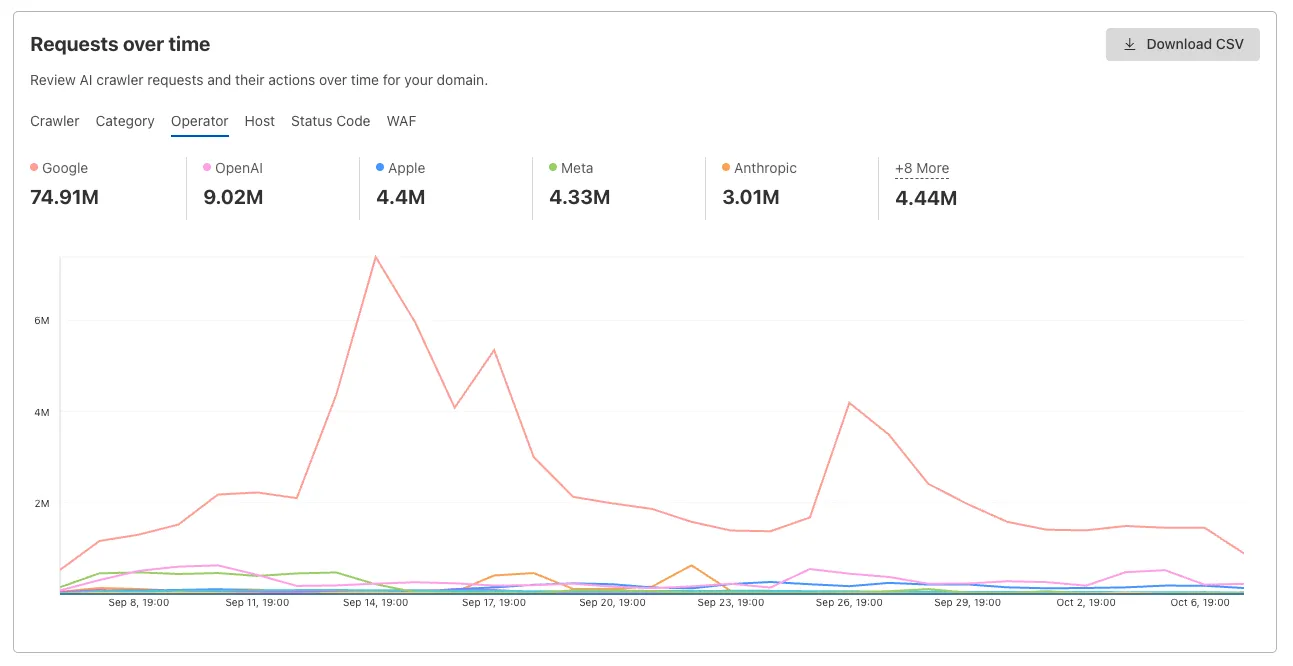 Interactive chart showing crawler requests over time with filterable dimensions
Analyze referrer data (Paid plans)
Identify traffic sources with referrer analytics:
- View top referrers driving traffic to your site
- Understand discovery patterns and content popularity from AI operators
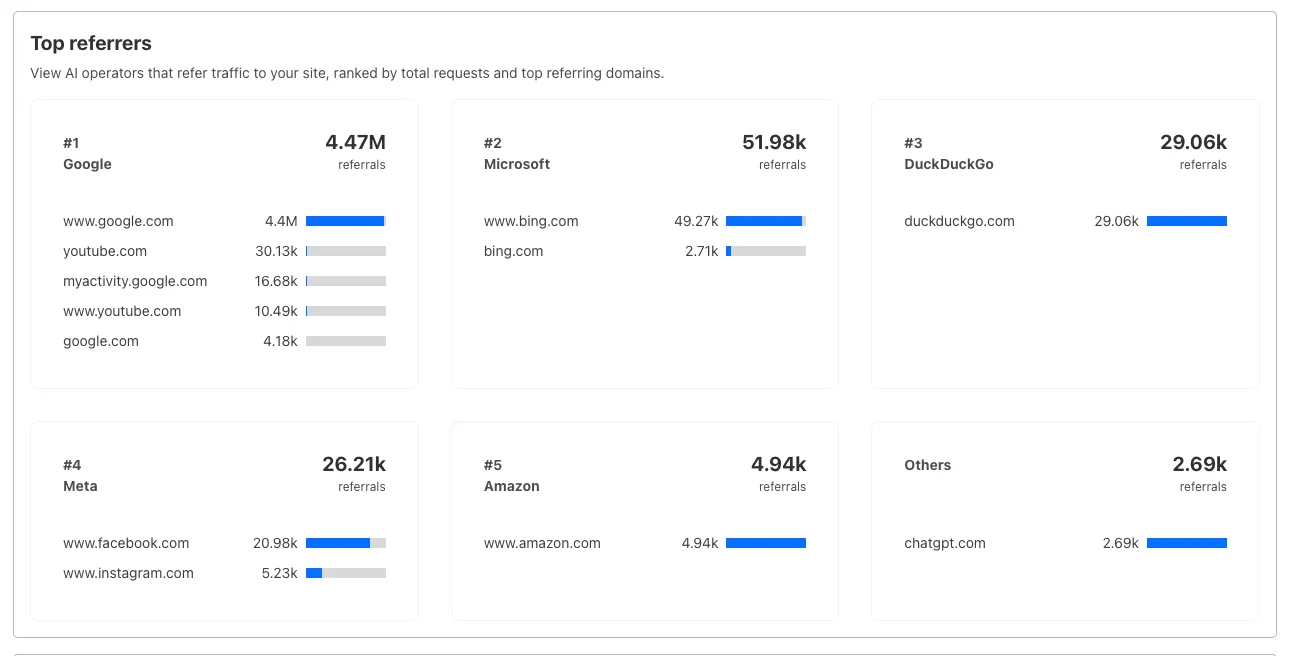 Bar chart showing top referrers and their respective traffic volumes
Export data
Download your filtered view as a CSV:
- Includes all applied filters and groupings
- Useful for custom reporting and deeper analysis
Get started
- Log in to the Cloudflare dashboard, and select your account and domain.
- Go to AI Crawl Control > Metrics.
- Use the grouping tabs to explore different views of your data.
- Apply filters to focus on specific crawlers, time ranges, or response codes.
- Select Download CSV to export your filtered data for further analysis.
Learn more about AI Crawl Control.
Source: original entry ↗
More from Cloudflare
Follow Cloudflare to get its new changes in your feed and email digest.
Cloudflare One Client for macOS 2026.8.2100.0
GA release for macOS Cloudflare One Client with improved split tunnel handling that no longer briefly blocks traffic during reconnects, support for non-RFC 1918 local IPv4 networks, faster connects with lower memory use, and numerous reliability fixes across DNS, reauthentication, and client stability.
Cloudflare One Client for Windows 2026.8.2100.0
This GA release improves split tunnel reliability, adds support for non-RFC 1918 local networks, optimizes connection performance with faster reconnections and lower memory usage, and includes numerous bug fixes for DNS, registration, and network handling. The client now features a service recovery mechanism that automatically restarts on system unlock and better handles large hosts files without blocking traffic.
Cloudflare One Client for Linux 2026.8.2100.0
New GA release for Linux with improved split tunnel handling that no longer briefly blocks traffic during reconnects, support for non-RFC 1918 local IPv4 networks, faster tunnel reconnections, and lower memory usage. Includes numerous stability and reliability fixes for DNS, reconnection behavior, and crash issues.