Email attachments now open safely with Browser Isolation
Cloudflare Email Security now allows you to safely view and investigate email attachments in a clientless, isolated browser. Attachments are classified by threat level (Malicious, Suspicious, Encrypted, etc.), reducing risk to analysts and your environment.
You can now safely open email attachments to view and investigate them.
What this means is that messages now have a Attachments section. Here, you can view processed attachments and their classifications (for example, Malicious, Suspicious, Encrypted). Next to each attachment, a Browser Isolation icon allows your team to safely open the file in a clientless, isolated browser with no risk to the analyst or your environment.
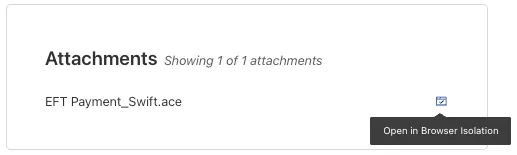
To use this feature, you must:
- Turn on Allow users to open a remote browser without the device client in your Zero Trust settings.
- Have Browser Isolation (BISO) seats assigned.
For more details, refer to our setup guide.
Some attachment types may not render in Browser Isolation. If there is a file type that you would like to be opened with Browser Isolation, reach out to your Cloudflare contact.
This feature is available across these Email security packages:
- Advantage
- Enterprise
- Enterprise + PhishGuard
Source: original entry ↗
More from Cloudflare
Follow Cloudflare to get its new changes in your feed and email digest.
Cloudflare One Client for macOS 2026.8.2100.0
GA release for macOS Cloudflare One Client with improved split tunnel handling that no longer briefly blocks traffic during reconnects, support for non-RFC 1918 local IPv4 networks, faster connects with lower memory use, and numerous reliability fixes across DNS, reauthentication, and client stability.
Cloudflare One Client for Windows 2026.8.2100.0
This GA release improves split tunnel reliability, adds support for non-RFC 1918 local networks, optimizes connection performance with faster reconnections and lower memory usage, and includes numerous bug fixes for DNS, registration, and network handling. The client now features a service recovery mechanism that automatically restarts on system unlock and better handles large hosts files without blocking traffic.
Cloudflare One Client for Linux 2026.8.2100.0
New GA release for Linux with improved split tunnel handling that no longer briefly blocks traffic during reconnects, support for non-RFC 1918 local IPv4 networks, faster tunnel reconnections, and lower memory usage. Includes numerous stability and reliability fixes for DNS, reconnection behavior, and crash issues.