Email security - Open email links with Browser Isolation
Cloudflare Email security now enables users to safely open links from emails in an isolated browser environment without device client, reducing risk during email investigation and threat analysis. The feature is available in Advantage, Enterprise, and Enterprise + PhishGuard packages.
You can now safely open links in emails to view and investigate them.
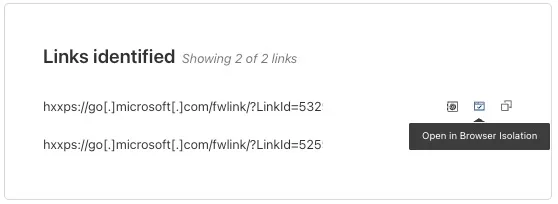
From Investigation, go to View details, and look for the Links identified section. Next to each link, the Cloudflare dashboard will display an Open in Browser Isolation icon which allows your team to safely open the link in a clientless, isolated browser with no risk to the analyst or your environment. Refer to Open links to learn more about this feature.
To use this feature, you must:
- Turn on Allow users to open a remote browser without the device client in your Zero Trust settings.
- Have Browser Isolation (RBI) seats assigned.
For more details, refer to our setup guide.
This feature is available across these Email security packages:
- Advantage
- Enterprise
- Enterprise + PhishGuard
Source: original entry ↗
More from Cloudflare
Follow Cloudflare to get its new changes in your feed and email digest.
Cloudflare One Client for Windows hotfix - trusted certificate chains
A new GA release for Windows Cloudflare One Client is available, addressing an issue with building trusted certificate chains.
Cloudflare One Client for macOS - Trusted Certificate Chain Fix
A new GA release of the macOS Cloudflare One Client is available. This hotfix addresses an issue with building trusted certificate chains.
Cloudflare One Client for Linux
A new GA release of Cloudflare One Client for Linux is now available. This hotfix addresses an issue with building trusted certificate chains.