Hyperdrive now exposes database connection pool size metrics
Hyperdrive now provides visibility into database connection pool metrics including waiting clients, current pool size, available slots, and maximum pool size through the Cloudflare dashboard and GraphQL Analytics API. This helps users self-diagnose connection issues and identify contention problems.
You can now view the size of your Hyperdrive database connection pools, giving you the ability to self-diagnose connection issues. Using the Cloudflare dashboard or the hyperdrivePoolSizesAdaptiveGroups dataset in the GraphQL Analytics API, you can see waitingClients, currentPoolSize, availablePoolSlots, and maxPoolSize for each of your configurations.
A new Pool connections chart has been added to the Metrics tab of each Hyperdrive configuration in the Cloudflare dashboard ↗. You can use the location selector to drill down into specific locations hosting your connection pool by airport code.
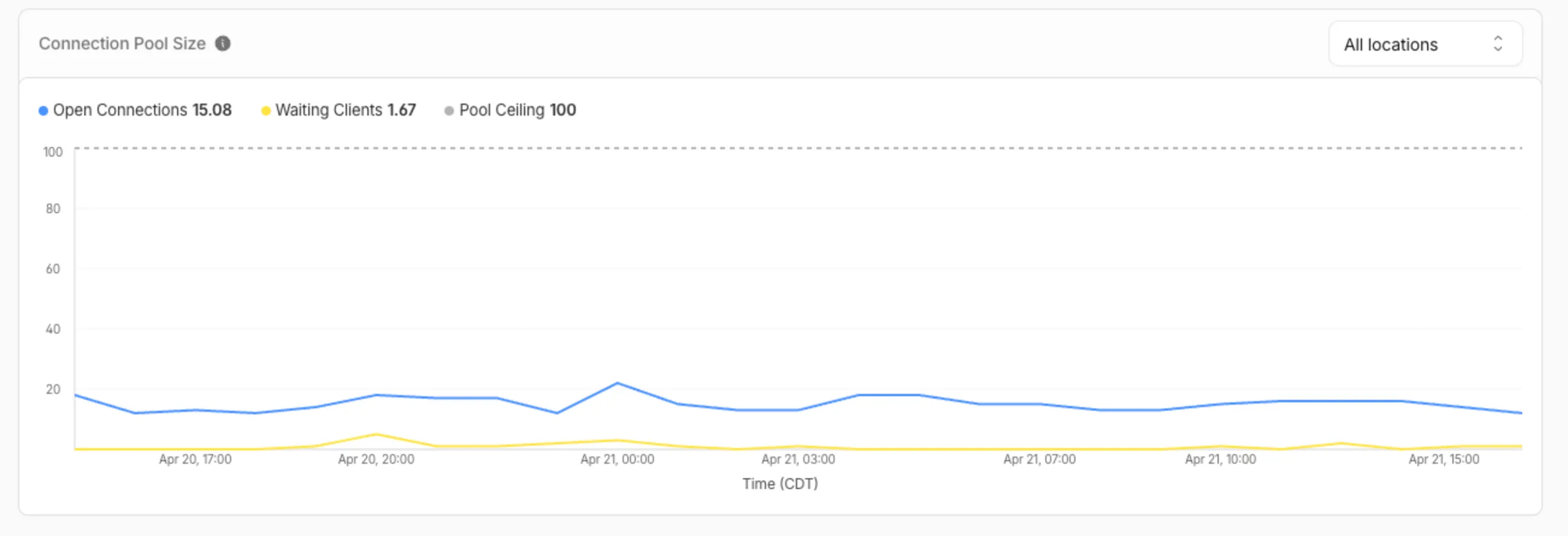
The chart shows:
- Waiting clients: Client requests waiting for an available connection.
- Open connections: Active connections to your database.
- Pool size maximum: Your configured origin connection limit.
Connection contention appears as a spike in waiting clients, or when open connections consistently approach the pool size maximum. If your open connections regularly approach this limit, consider contacting Cloudflare to increase your Hyperdrive connection limit.
Pool size metrics
The hyperdrivePoolSizesAdaptiveGroups dataset in the GraphQL Analytics API exposes the following key connection pool metrics for each Hyperdrive configuration:
Under avg:
currentPoolSize— Average number of connections currently open in the pool.availablePoolSlots— Average number of pool connections available for checkout.waitingClients— Average number of clients waiting for a connection from the pool.
Under max:
maxPoolSize— Configured maximum size of the connection pool.currentPoolSize— Peak number of connections open in the pool.waitingClients— Peak number of clients waiting for a connection from the pool.
For more information, refer to Metrics and analytics and Connection pooling.
Source: original entry ↗
More from Cloudflare
Follow Cloudflare to get its new changes in your feed and email digest.
Cloudflare One Client for macOS 2026.8.2100.0
GA release for macOS Cloudflare One Client with improved split tunnel handling that no longer briefly blocks traffic during reconnects, support for non-RFC 1918 local IPv4 networks, faster connects with lower memory use, and numerous reliability fixes across DNS, reauthentication, and client stability.
Cloudflare One Client for Windows 2026.8.2100.0
This GA release improves split tunnel reliability, adds support for non-RFC 1918 local networks, optimizes connection performance with faster reconnections and lower memory usage, and includes numerous bug fixes for DNS, registration, and network handling. The client now features a service recovery mechanism that automatically restarts on system unlock and better handles large hosts files without blocking traffic.
Cloudflare One Client for Linux 2026.8.2100.0
New GA release for Linux with improved split tunnel handling that no longer briefly blocks traffic during reconnects, support for non-RFC 1918 local IPv4 networks, faster tunnel reconnections, and lower memory usage. Includes numerous stability and reliability fixes for DNS, reconnection behavior, and crash issues.