Network session analytics dashboard available in Cloudflare One
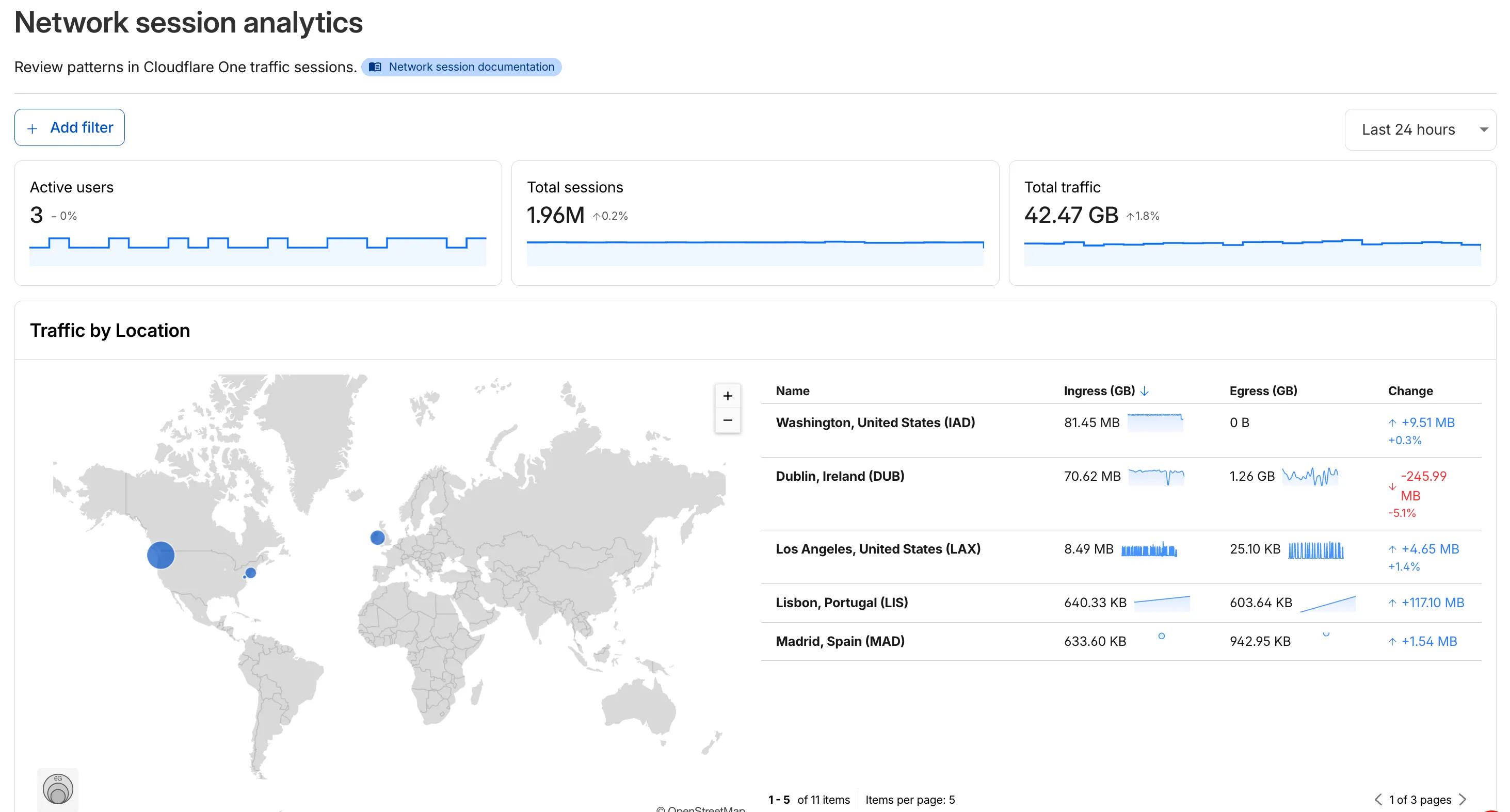
A new Network session analytics dashboard is now available in Cloudflare One, providing visibility into network traffic patterns, geographic distribution, key metrics like session count and bytes transferred, protocol usage breakdown, and connection diagnostics to help troubleshoot network issues.
The new Network session analytics dashboard is now available in Cloudflare One. This dashboard provides visibility into your network traffic patterns, helping you understand how traffic flows through your Cloudflare One infrastructure.
What you can do with Network session analytics
- Analyze geographic distribution: View a world map showing where your network traffic originates, with a list of top locations by session count.
- Monitor key metrics: Track session count, total bytes transferred, and unique users.
- Identify connection issues: Analyze connection close reasons to troubleshoot network problems.
- Review protocol usage: See which network protocols (TCP, UDP, ICMP) are most used.
Dashboard features
- Summary metrics: Session count, bytes total, and unique users
- Traffic by location: World map visualization and location list with top traffic sources
- Top protocols: Breakdown of TCP, UDP, ICMP, and ICMPv6 traffic
- Connection close reasons: Insights into why sessions terminated (client closed, origin closed, timeouts, errors)
How to access
- Log in to Cloudflare One ↗.
- Go to Zero Trust > Insights > Dashboards.
- Select Network session analytics.
For more information, refer to the Network session analytics documentation.
Source: original entry ↗
More from Cloudflare
Follow Cloudflare to get its new changes in your feed and email digest.
Cloudflare One Client for macOS 2026.8.2100.0
GA release for macOS Cloudflare One Client with improved split tunnel handling that no longer briefly blocks traffic during reconnects, support for non-RFC 1918 local IPv4 networks, faster connects with lower memory use, and numerous reliability fixes across DNS, reauthentication, and client stability.
Cloudflare One Client for Windows 2026.8.2100.0
This GA release improves split tunnel reliability, adds support for non-RFC 1918 local networks, optimizes connection performance with faster reconnections and lower memory usage, and includes numerous bug fixes for DNS, registration, and network handling. The client now features a service recovery mechanism that automatically restarts on system unlock and better handles large hosts files without blocking traffic.
Cloudflare One Client for Linux 2026.8.2100.0
New GA release for Linux with improved split tunnel handling that no longer briefly blocks traffic during reconnects, support for non-RFC 1918 local IPv4 networks, faster tunnel reconnections, and lower memory usage. Includes numerous stability and reliability fixes for DNS, reconnection behavior, and crash issues.