Open email links with Security Center
You can now investigate email links directly in Cloudflare Security Center to generate detailed reports including phishing scans, SSL certificate data, HTTP details, DNS records, and technology information. This allows your team to safely analyze links without exposing analysts or your environment to risk.
You can now investigate links in emails with Cloudflare Security Center to generate a report containing a myriad of technical details: a phishing scan, SSL certificate data, HTTP request and response data, page performance data, DNS records, what technologies and libraries the page uses, and more.
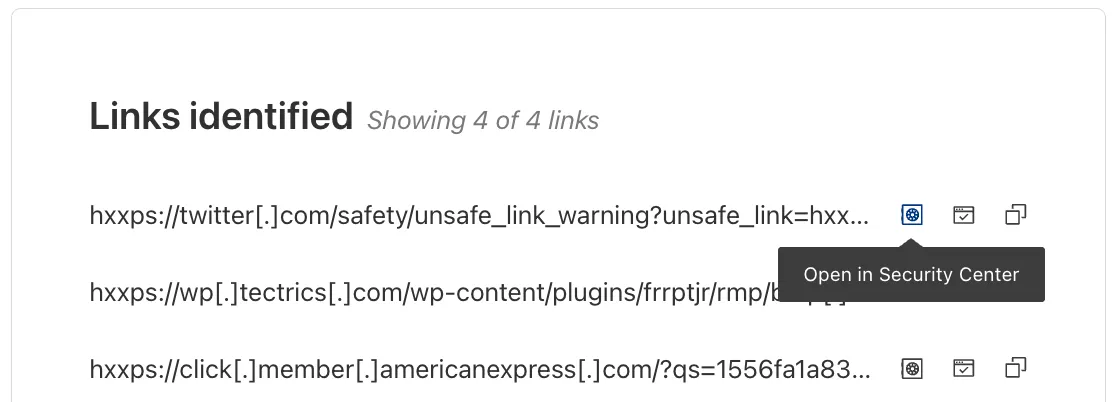
From Investigation, go to View details, and look for the Links identified section. Select Open in Security Center next to each link. Open in Security Center allows your team to quickly generate a detailed report about the link with no risk to the analyst or your environment.
For more details, refer to Open links.
This feature is available across these Email security packages:
- Advantage
- Enterprise
- Enterprise + PhishGuard
Source: original entry ↗
More from Cloudflare
Follow Cloudflare to get its new changes in your feed and email digest.
Cloudflare One Client for Windows hotfix - trusted certificate chains
A new GA release for Windows Cloudflare One Client is available, addressing an issue with building trusted certificate chains.
Cloudflare One Client for macOS - Trusted Certificate Chain Fix
A new GA release of the macOS Cloudflare One Client is available. This hotfix addresses an issue with building trusted certificate chains.
Cloudflare One Client for Linux
A new GA release of Cloudflare One Client for Linux is now available. This hotfix addresses an issue with building trusted certificate chains.