Pipelines: dropped event metrics, typed bindings, and improved setup
Cloudflare Pipelines now provides detailed metrics and dashboards for dropped events with error breakdowns, adds TypeScript support for schema-specific Pipeline bindings to catch errors at compile time, and simplifies setup with automated R2 bucket creation and recommended defaults.
Cloudflare Pipelines ingests streaming data via Workers or HTTP endpoints, transforms it with SQL, and writes it to R2 as Apache Iceberg tables. Today we're shipping three improvements to help you understand why streaming events get dropped, catch data quality issues early, and set up Pipelines faster.
Dropped event metrics
When stream events don't match the expected schema, Pipelines accepts them during ingestion but drops them when attempting to deliver them to the sink. To help you identify the root cause of these issues, we are introducing a new dashboard and metrics that surface dropped events with detailed error messages.
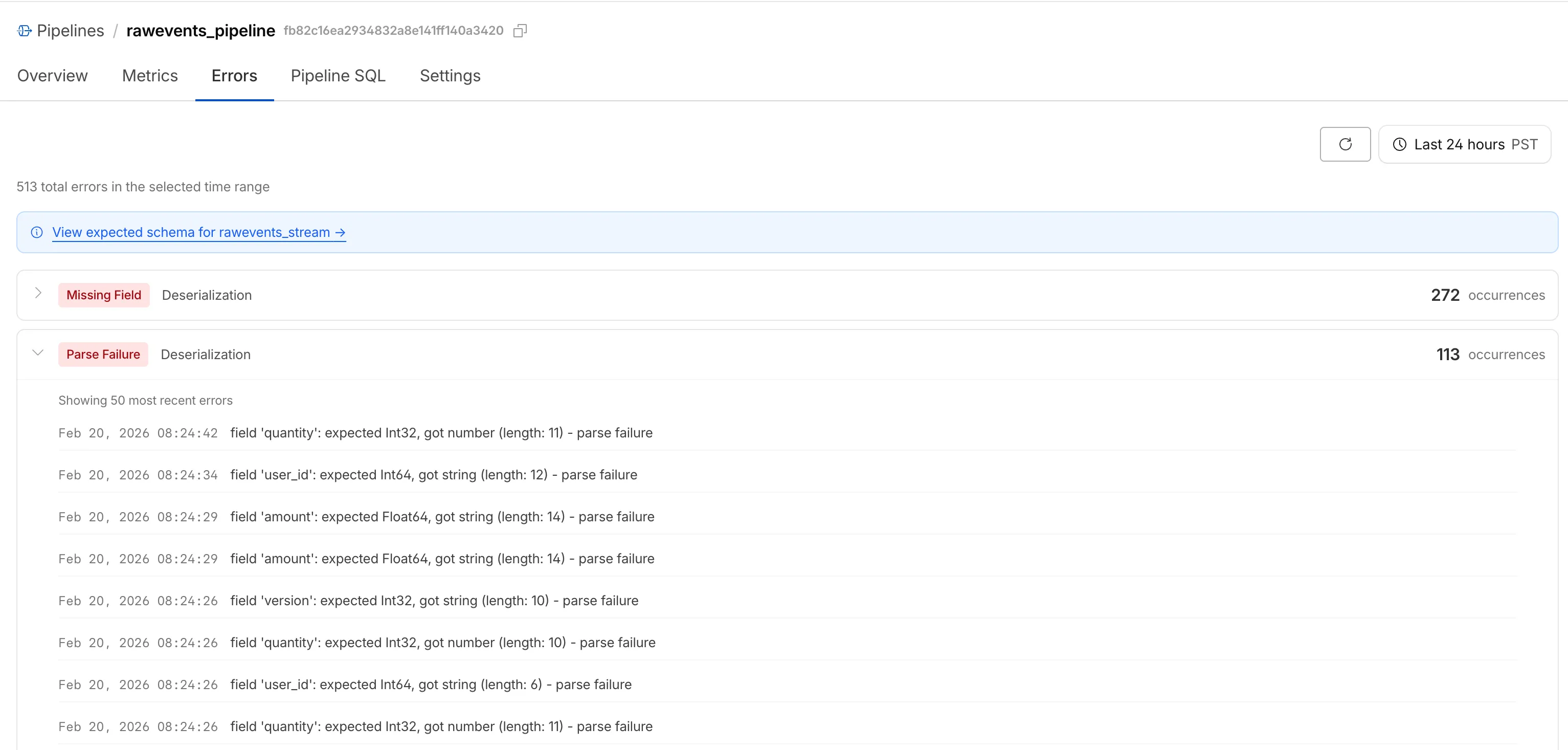
Dropped events can also be queried programmatically via the new pipelinesUserErrorsAdaptiveGroups GraphQL dataset. The dataset breaks down failures by specific error type (missing_field, type_mismatch, parse_failure, or null_value) so you can trace issues back to the source.
query GetPipelineUserErrors(
	$accountTag: String!
	$pipelineId: String!
	$datetimeStart: Time!
	$datetimeEnd: Time!
) {
	viewer {
		accounts(filter: { accountTag: $accountTag }) {
			pipelinesUserErrorsAdaptiveGroups(
				limit: 100
				filter: {
					pipelineId: $pipelineId
					datetime_geq: $datetimeStart
					datetime_leq: $datetimeEnd
				}
				orderBy: [count_DESC]
			) {
				count
				dimensions {
					errorFamily
					errorType
				}
			}
		}
	}
}
For the full list of dimensions, error types, and additional query examples, refer to User error metrics.
Typed Pipelines bindings
Sending data to a Pipeline from a Worker previously used a generic Pipeline<PipelineRecord> type, which meant schema mismatches (wrong field names, incorrect types) were only caught at runtime as dropped events.
Running wrangler types now generates schema-specific TypeScript types for your Pipeline bindings. TypeScript catches missing required fields and incorrect field types at compile time, before your code is deployed.
declare namespace Cloudflare {
	type EcommerceStreamRecord = {
		user_id: string;
		event_type: string;
		product_id?: string;
		amount?: number;
	};
	interface Env {
		STREAM: import("cloudflare:pipelines").Pipeline<Cloudflare.EcommerceStreamRecord>;
	}
}
For more information, refer to Typed Pipeline bindings.
Improved Pipelines setup
Setting up a new Pipeline previously required multiple manual steps: creating an R2 bucket, enabling R2 Data Catalog, generating an API token, and configuring format, compression, and rolling policies individually.
The wrangler pipelines setup command now offers a Simple setup mode that applies recommended defaults and automatically creates the R2 bucket and enables R2 Data Catalog if they do not already exist. Validation errors during setup prompt you to retry inline rather than restarting the entire process.
For a full walkthrough, refer to the Getting started guide.
Source: original entry ↗
More from Cloudflare
Follow Cloudflare to get its new changes in your feed and email digest.
Cloudflare One Client for macOS 2026.8.2100.0
GA release for macOS Cloudflare One Client with improved split tunnel handling that no longer briefly blocks traffic during reconnects, support for non-RFC 1918 local IPv4 networks, faster connects with lower memory use, and numerous reliability fixes across DNS, reauthentication, and client stability.
Cloudflare One Client for Windows 2026.8.2100.0
This GA release improves split tunnel reliability, adds support for non-RFC 1918 local networks, optimizes connection performance with faster reconnections and lower memory usage, and includes numerous bug fixes for DNS, registration, and network handling. The client now features a service recovery mechanism that automatically restarts on system unlock and better handles large hosts files without blocking traffic.
Cloudflare One Client for Linux 2026.8.2100.0
New GA release for Linux with improved split tunnel handling that no longer briefly blocks traffic during reconnects, support for non-RFC 1918 local IPv4 networks, faster tunnel reconnections, and lower memory usage. Includes numerous stability and reliability fixes for DNS, reconnection behavior, and crash issues.