Workers - Create and deploy from Git repositories
You can now create and deploy Cloudflare Workers directly from Git repositories by importing an existing repo or deploying from production-ready templates. Cloudflare automatically builds and deploys your Worker with every push to your chosen branch, with support for popular frameworks like Astro, Remix, and Next.js.
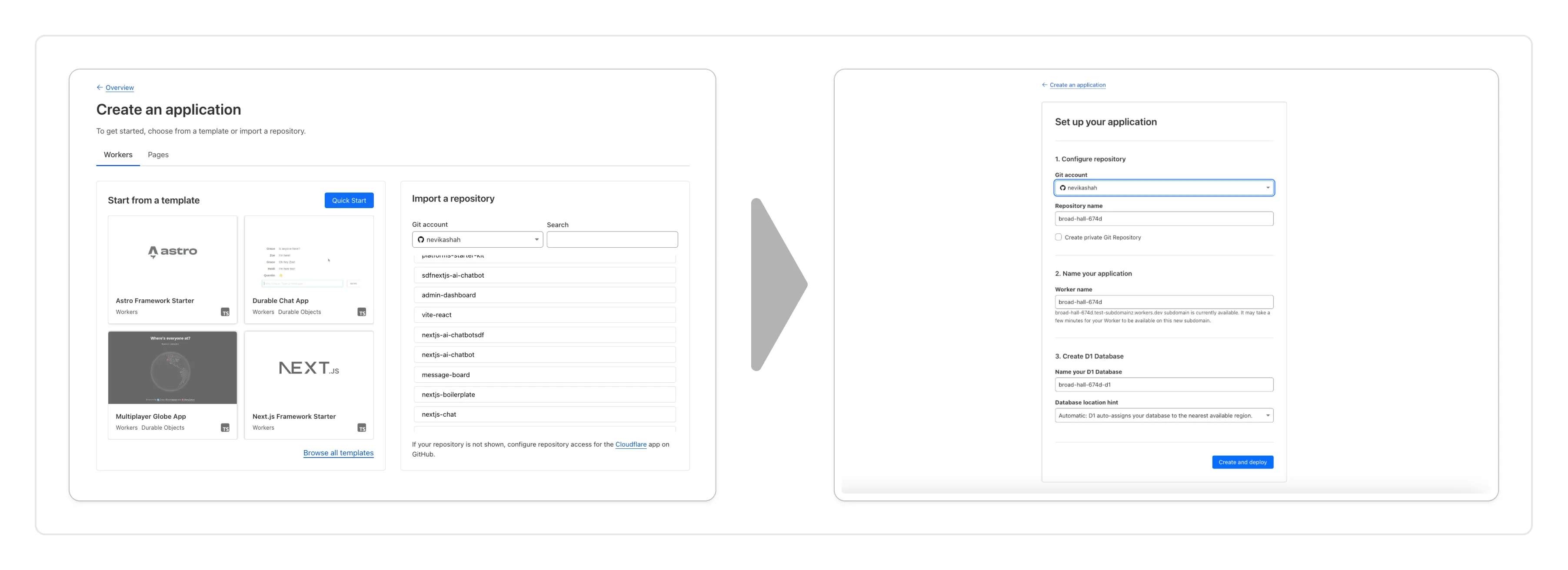
You can now create a Worker by:
- Importing a Git repository: Choose an existing Git repo on your GitHub/GitLab account and set up Workers Builds to deploy your Worker.
- Deploying a template with Git: Choose from a brand new selection of production ready examples ↗ to help you get started with popular frameworks like Astro ↗, Remix ↗ and Next ↗ or build stateful applications with Cloudflare resources like D1 databases, Workers AI or Durable Objects! When you're ready to deploy, Cloudflare will set up your project by cloning the template to your GitHub/GitLab account, provisioning any required resources and deploying your Worker.
With every push to your chosen branch, Cloudflare will automatically build and deploy your Worker.
To get started, go to the Workers dashboard ↗.
These new features are available today in the Cloudflare dashboard to a subset of Cloudflare customers, and will be coming to all customers in the next few weeks. Don't see it in your dashboard, but want early access? Add your Cloudflare Account ID to this form ↗.
Source: original entry ↗
More from Cloudflare
Follow Cloudflare to get its new changes in your feed and email digest.
Cloudflare One Client for macOS 2026.8.2100.0
GA release for macOS Cloudflare One Client with improved split tunnel handling that no longer briefly blocks traffic during reconnects, support for non-RFC 1918 local IPv4 networks, faster connects with lower memory use, and numerous reliability fixes across DNS, reauthentication, and client stability.
Cloudflare One Client for Windows 2026.8.2100.0
This GA release improves split tunnel reliability, adds support for non-RFC 1918 local networks, optimizes connection performance with faster reconnections and lower memory usage, and includes numerous bug fixes for DNS, registration, and network handling. The client now features a service recovery mechanism that automatically restarts on system unlock and better handles large hosts files without blocking traffic.
Cloudflare One Client for Linux 2026.8.2100.0
New GA release for Linux with improved split tunnel handling that no longer briefly blocks traffic during reconnects, support for non-RFC 1918 local IPv4 networks, faster tunnel reconnections, and lower memory usage. Includes numerous stability and reliability fixes for DNS, reconnection behavior, and crash issues.