Workers - One-click Cloudflare Access for Workers
Enable Cloudflare Access for your workers.dev and Preview URLs with a single click to restrict access to specific users or groups. The update includes JWT validation examples and environment variable configuration guidance for securing your applications.
You can now enable Cloudflare Access for your workers.dev and Preview URLs in a single click.
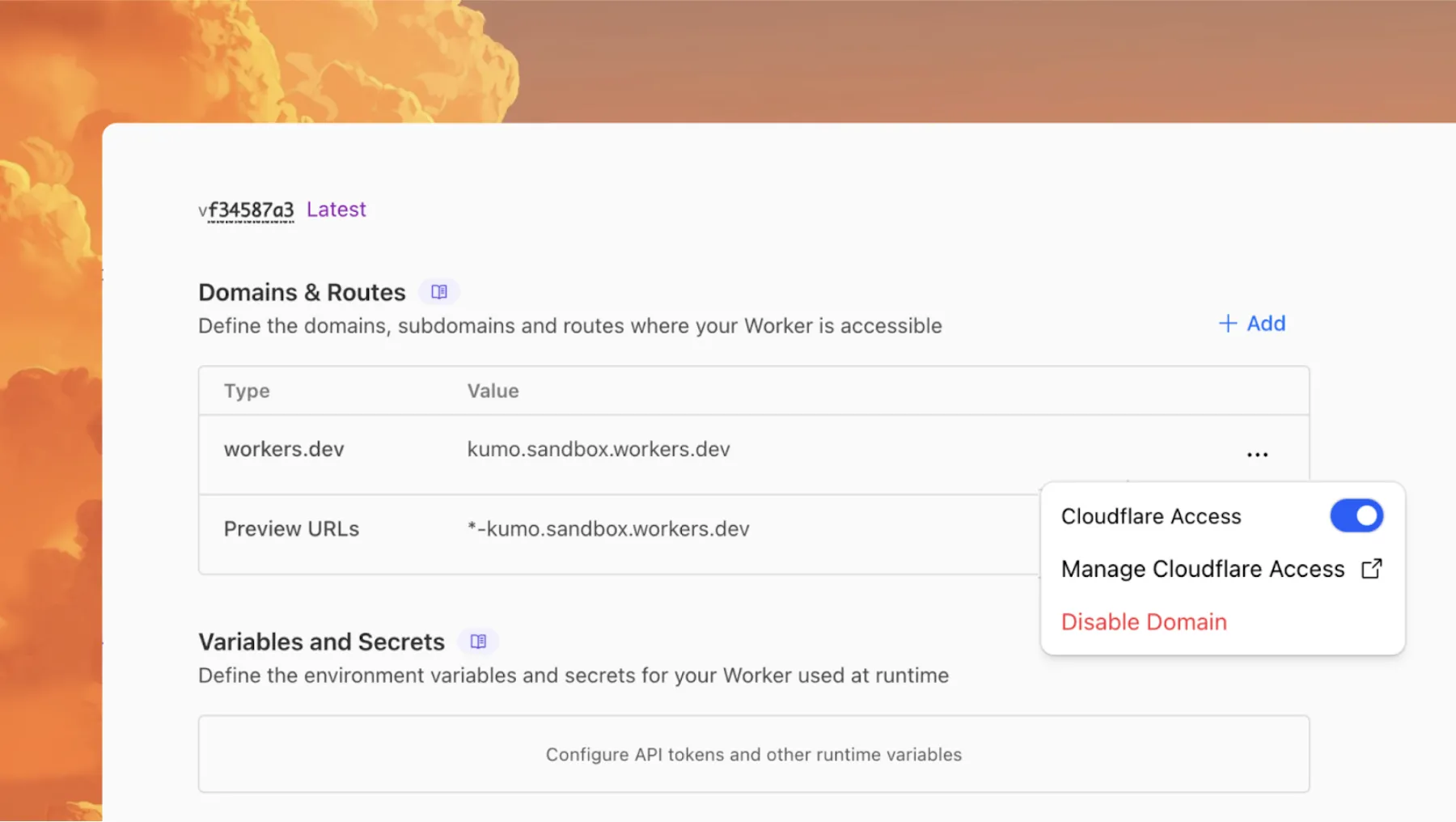
Access allows you to limit access to your Workers to specific users or groups. You can limit access to yourself, your teammates, your organization, or anyone else you specify in your Access policy.
To enable Cloudflare Access:
-
In the Cloudflare dashboard, go to the Workers & Pages page.
Go to Workers & Pages ↗ -
In Overview, select your Worker.
-
Go to Settings > Domains & Routes.
-
For
workers.devor Preview URLs, click Enable Cloudflare Access. -
Optionally, to configure the Access application, click Manage Cloudflare Access. There, you can change the email addresses you want to authorize. View Access policies to learn about configuring alternate rules.
To fully secure your application, it is important that you validate the JWT that Cloudflare Access adds to the Cf-Access-Jwt-Assertion header on the incoming request.
The following code will validate the JWT using the jose NPM package ↗:
import { jwtVerify, createRemoteJWKSet } from "jose";

export default {
	async fetch(request, env, ctx) {
		// Verify the POLICY_AUD environment variable is set
		if (!env.POLICY_AUD) {
			return new Response("Missing required audience", {
				status: 403,
				headers: { "Content-Type": "text/plain" },
			});
		}

		// Get the JWT from the request headers
		const token = request.headers.get("cf-access-jwt-assertion");

		// Check if token exists
		if (!token) {
			return new Response("Missing required CF Access JWT", {
				status: 403,
				headers: { "Content-Type": "text/plain" },
			});
		}

		try {
			// Create JWKS from your team domain
			const JWKS = createRemoteJWKSet(
				new URL(`${env.TEAM_DOMAIN}/cdn-cgi/access/certs`),
			);

			// Verify the JWT
			const { payload } = await jwtVerify(token, JWKS, {
				issuer: env.TEAM_DOMAIN,
				audience: env.POLICY_AUD,
			});

			// Token is valid, proceed with your application logic
			return new Response(`Hello ${payload.email || "authenticated user"}!`, {
				headers: { "Content-Type": "text/plain" },
			});
		} catch (error) {
			// Token verification failed
			return new Response(`Invalid token: ${error.message}`, {
				status: 403,
				headers: { "Content-Type": "text/plain" },
			});
		}
	},
};
Required environment variables
Add these environment variables to your Worker:
POLICY_AUD: Your application's AUD tagTEAM_DOMAIN:https://<your-team-name>.cloudflareaccess.com
Both of these appear in the modal that appears when you enable Cloudflare Access.
You can set these variables by adding them to your Worker's Wrangler configuration file, or via the Cloudflare dashboard under Workers & Pages > your-worker > Settings > Environment Variables.
Source: original entry ↗
More from Cloudflare
Follow Cloudflare to get its new changes in your feed and email digest.
Cloudflare One Client for macOS 2026.8.2100.0
GA release for macOS Cloudflare One Client with improved split tunnel handling that no longer briefly blocks traffic during reconnects, support for non-RFC 1918 local IPv4 networks, faster connects with lower memory use, and numerous reliability fixes across DNS, reauthentication, and client stability.
Cloudflare One Client for Windows 2026.8.2100.0
This GA release improves split tunnel reliability, adds support for non-RFC 1918 local networks, optimizes connection performance with faster reconnections and lower memory usage, and includes numerous bug fixes for DNS, registration, and network handling. The client now features a service recovery mechanism that automatically restarts on system unlock and better handles large hosts files without blocking traffic.
Cloudflare One Client for Linux 2026.8.2100.0
New GA release for Linux with improved split tunnel handling that no longer briefly blocks traffic during reconnects, support for non-RFC 1918 local IPv4 networks, faster tunnel reconnections, and lower memory usage. Includes numerous stability and reliability fixes for DNS, reconnection behavior, and crash issues.