Workers — Per-branch preview deployments
Cloudflare Workers now supports per-branch preview deployments when connected to GitHub or GitLab, giving each branch a stable preview URL to test changes before merging to production. Preview URLs are automatically generated and posted to pull requests, with the option to set custom aliases via Wrangler CLI.
Now, when you connect your Cloudflare Worker to a git repository on GitHub or GitLab, each branch of your repository has its own stable preview URL, that you can use to preview code changes before merging the pull request and deploying to production.
This works the same way that Cloudflare Pages does — every time you create a pull request, you'll automatically get a shareable preview link where you can see your changes running, without affecting production. The link stays the same, even as you add commits to the same branch. These preview URLs are named after your branch and are posted as a comment to each pull request. The URL stays the same with every commit and always points to the latest version of that branch.
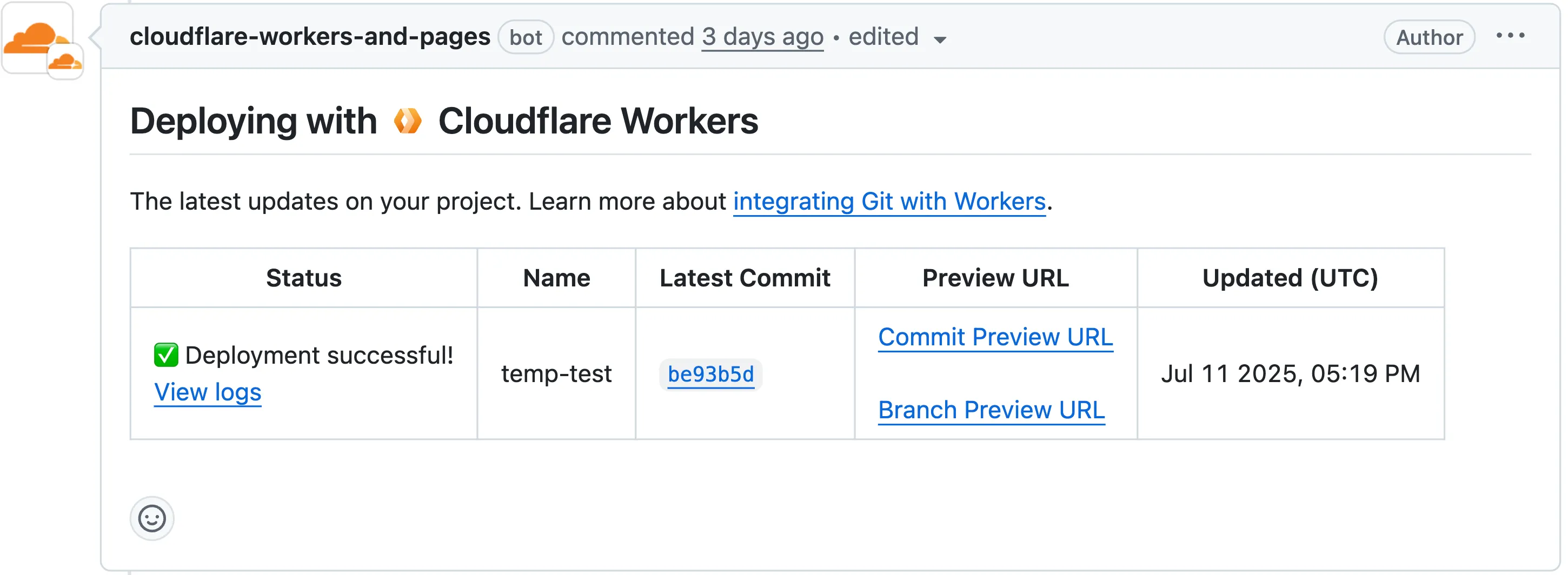
Preview URL types
Each comment includes two preview URLs as shown above:
- Commit Preview URL: Unique to the specific version/commit (e.g.,
<version-prefix>-<worker-name>.<subdomain>.workers.dev) - Branch Preview URL: A stable alias based on the branch name (e.g.,
<branch-name>-<worker-name>.<subdomain>.workers.dev)
How it works
When you create a pull request:
- A preview alias is automatically created based on the Git branch name (e.g.,
<branch-name>becomes<branch-name>-<worker-name>.<subdomain>.workers.dev) - No configuration is needed, the alias is generated for you
- The link stays the same even as you add commits to the same branch
- Preview URLs are posted directly to your pull request as comments (just like they are in Cloudflare Pages)
Custom alias name
You can also assign a custom preview alias using the Wrangler CLI, by passing the --preview-alias flag when uploading a version of your Worker:
wrangler versions upload --preview-alias stagingLimitations while in beta
- Only available on the workers.dev subdomain (custom domains not yet supported)
- Requires Wrangler v4.21.0+
- Preview URLs are not generated for Workers that use Durable Objects
- Not yet supported for Workers for Platforms
Source: original entry ↗
More from Cloudflare
Follow Cloudflare to get its new changes in your feed and email digest.
Cloudflare One Client for macOS 2026.8.2100.0
GA release for macOS Cloudflare One Client with improved split tunnel handling that no longer briefly blocks traffic during reconnects, support for non-RFC 1918 local IPv4 networks, faster connects with lower memory use, and numerous reliability fixes across DNS, reauthentication, and client stability.
Cloudflare One Client for Windows 2026.8.2100.0
This GA release improves split tunnel reliability, adds support for non-RFC 1918 local networks, optimizes connection performance with faster reconnections and lower memory usage, and includes numerous bug fixes for DNS, registration, and network handling. The client now features a service recovery mechanism that automatically restarts on system unlock and better handles large hosts files without blocking traffic.
Cloudflare One Client for Linux 2026.8.2100.0
New GA release for Linux with improved split tunnel handling that no longer briefly blocks traffic during reconnects, support for non-RFC 1918 local IPv4 networks, faster tunnel reconnections, and lower memory usage. Includes numerous stability and reliability fixes for DNS, reconnection behavior, and crash issues.