Zaraz moves to Tag Management category in dashboard
Zaraz is now accessible from the Tag Management section on the Cloudflare dashboard, making it easier to compare and configure settings across multiple zones without going through individual zone settings.
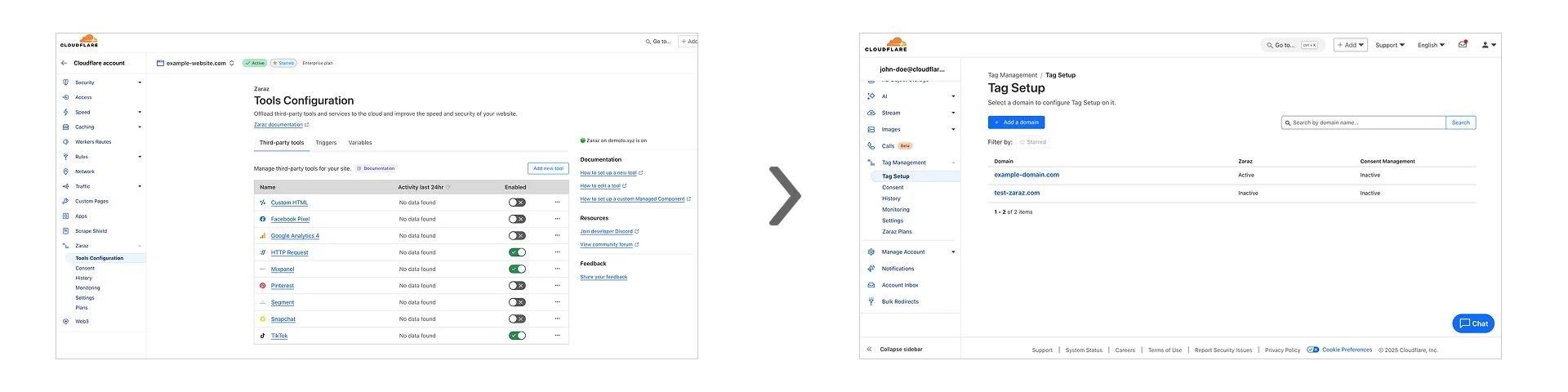
Previously, you could only configure Zaraz by going to each individual zone under your Cloudflare account. Now, if you’d like to get started with Zaraz or manage your existing configuration, you can navigate to the Tag Management ↗ section on the Cloudflare dashboard – this will make it easier to compare and configure the same settings across multiple zones.
These changes will not alter any existing configuration or entitlements for zones you already have Zaraz enabled on. If you’d like to edit existing configurations, you can go to the Tag Setup ↗ section of the dashboard, and select the zone you'd like to edit.
Source: original entry ↗
More from Cloudflare
Follow Cloudflare to get its new changes in your feed and email digest.
Cloudflare One Client for Windows hotfix - trusted certificate chains
A new GA release for Windows Cloudflare One Client is available, addressing an issue with building trusted certificate chains.
Cloudflare One Client for macOS - Trusted Certificate Chain Fix
A new GA release of the macOS Cloudflare One Client is available. This hotfix addresses an issue with building trusted certificate chains.
Cloudflare One Client for Linux
A new GA release of Cloudflare One Client for Linux is now available. This hotfix addresses an issue with building trusted certificate chains.